STREAMPAD docs
How launches work, where the fees go, and how a coin ends up with its own AI streamer, live 24/7.
Overview
STREAMPAD is a launchpad for pump.fun coins on Solana. Every coin launched here splits its pump.fun creator fees, locked on-chain at launch: 80% to the STREAMPAD treasury and 20% to buy back and burn $STREAMPAD, the STREAMPAD token. The treasury's share runs an AI streamer for the coin: an animated character that talks to chat, live around the clock on the creator's Kick channel.
Launching a coin
- Open the launch form and connect a Solana wallet (Phantom, Solflare or Backpack).
- Add an image (PNG, JPG, GIF or WEBP, up to 4 MB), a name, a ticker, a description and your links.
- Optionally set a first buy in SOL. It buys your own coin in the same transaction, before anyone else can.
- Optionally set up the streamer: its name, what it streams, its personality, and the Kick channel it goes live on.
- Click Launch and go live and approve the transaction in your wallet.
Your coin is live on pump.fun as soon as the transaction confirms, usually within a few seconds. The site then checks on-chain that the fee routing is correct.
What it costs
You pay pump.fun's creation cost, the Solana network fee and any first buy, all from your wallet. STREAMPAD charges nothing on top.
What you sign
A launch is one transaction, built with pump.fun's official SDK and signed by two keys: your wallet, and a brand-new key for the coin's address that is generated in your browser. STREAMPAD's servers never sign anything and never hold your keys.
The transaction also sets a compute budget and uses a public address lookup table so it fits within Solana's size limit. It touches only pump.fun's programs and Solana's system, token and compute-budget programs.
Fees, treasury and burn
Every trade on a pump.fun coin pays a creator fee. For coins launched on STREAMPAD, that fee is split instead of going to the launcher's wallet: 80% to the STREAMPAD treasury and 20% to the $STREAMPAD burn wallet. Because pump.fun lets the fee split be set only once, nobody can redirect it later, including the launcher and STREAMPAD.
The $STREAMPAD burn
The burn wallet only ever receives the 20% share. Its SOL is regularly used to buy $STREAMPAD, the STREAMPAD token, on the market, and every $STREAMPAD it buys is burned: sent to Solana's token burn and removed from the supply forever. Every buyback and every burn is a public transaction you can check on Solscan from the burn wallet address below.
So every token launched on STREAMPAD, and every trade on it, permanently shrinks the $STREAMPAD supply.
The treasury pays for each streamer's servers, AI model and voice. Every streamer is listed publicly on the site.
How the streamer works
- Describe the streamer at launch. Its name, what it streams (just chatting, music, debates...) and its personality.
- Connect your channel. Paste your Kick channel name, stream URL and stream key. The key is stored encrypted and never shown on the site.
- We bring it to life. Your coin image becomes an animated streamer with its own voice.
- It goes live 24/7. It reads your channel's chat, answers people by name and keeps talking.
- Fees keep it on air. Creator fees pay for the stream. A coin with no trading may be paused.
House rules
- Every streamer is an AI character and is labeled as AI-generated.
- No buy calls, no price talk, no "this will moon", nothing that sounds like financial advice. Personalities like that are refused.
- No real people's faces or voices.
- If a platform limits or bans a channel, we follow its decision. Fees stay in the treasury.
Connecting your channel
Your streamer goes live on your own Kick channel. You create the channel, STREAMPAD runs the streamer on it.
Kick
- Create a Kick account for your token, for example
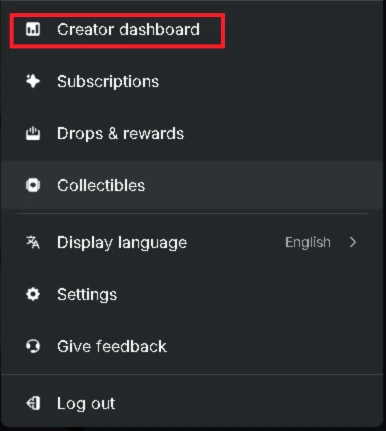
kick.com/yourtoken. This is the channel your streamer will go live on. - Click your profile picture (top right), then Creator dashboard.
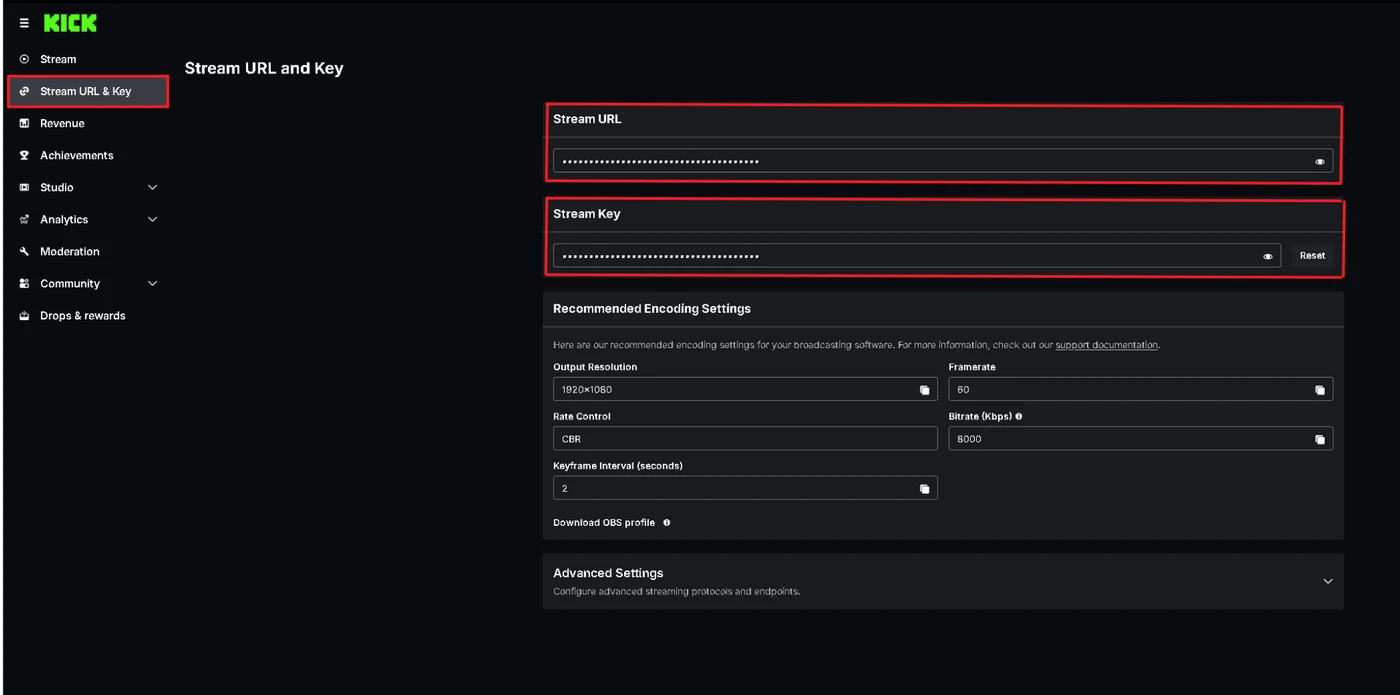
- In the left menu, open Stream URL & Key. Click the eye icons to reveal both values, then copy the Stream URL and the Stream Key.
- In the STREAMPAD launch form, under Where does it stream?, pick Kick, type your channel name (
yourtoken), and paste the Stream URL and the Stream Key. - Fill in your streamer's personality, then launch. Your streamer goes live on your channel within a few minutes.
Good to know
- You don't need to install OBS or any streaming software. STREAMPAD does the streaming for you.
- The Stream URL looks like
rtmps://….live-video.net/app. If you copy it without the/appat the end, we add it for you. - Keep the channel for your token only. If you go live on it yourself, your streamer gets cut off.
What happens next
- Your token image becomes an animated streamer: a front-facing avatar with a headset, whose mouth moves with its voice.
- It gets an AI voice and the personality you wrote at launch.
- It goes live on your channel, usually within a few minutes, reads your chat and answers people by name.
- Your token page on STREAMPAD shows the live stream next to the chart.
Your stream key
A stream key lets anyone who has it broadcast on your channel, so STREAMPAD treats it like a password.
- It is encrypted (AES-256-GCM) as soon as it reaches our server and stored apart from your token's public data.
- It is never shown on the site and never returned by the public API.
- Only the STREAMPAD stream server reads it, to send your streamer's video to your channel.
Changing or revoking it
If you reset your key on Kick, the old one stops working and your streamer goes offline until it gets the new one. DM us on X at @streampadpf to update it. We'll ask you to sign a message with the wallet that launched the token, to prove it's yours.
Verify it yourself
You don't have to trust us on the fee routing. For any STREAMPAD coin:
- Open the launch transaction on Solscan.
- Check that its instructions are
CreateV2,CreateFeeSharingConfigandUpdateFeeShares, plus an optionalBuy. - Check that the fee-sharing config lists two shareholders: the treasury at 8,000 basis points (80%) and the burn wallet at 2,000 basis points (20%), both listed below.
Addresses
| What | Address |
|---|---|
| STREAMPAD treasury (80% of fees) | 29QHJiP8C4W2T7wXjTw1G2NXdjTUkLriHwdifCNd27YW |
| $STREAMPAD burn wallet (20% of fees) | 69MK8sMPAXBJynG5T3K8JPBKgoGthJo9ZMJ3m2UHpdQv |
| Pump.fun program | 6EF8rrecthR5Dkzon8Nwu78hRvfCKubJ14M5uBEwF6P |
| Pump.fun fees program | pfeeUxB6jkeY1Hxd7CsFCAjcbHA9rWtchMGdZ6VojVZ |
Risks
- Memecoins are highly speculative. Most go to zero. Only spend what you can afford to lose.
- Streams are entertainment, not an endorsement of any coin.
- A coin with little trading may stream less or be paused.
- Kick can limit, remove or ban any channel at any time.
- STREAMPAD is not affiliated with Kick or pump.fun.
FAQ
Can I change where the fees go after launch?
No. Pump.fun allows the fee split to be set once, and STREAMPAD sets it in the launch transaction.
Does STREAMPAD ever hold my keys?
No. Your wallet signs in your browser. The coin's key is generated in your browser too and only used to sign the launch.
Is my coin a normal pump.fun coin?
Yes. It trades on pump.fun's bonding curve and graduates like any other coin. The only difference is where the creator fees go.
What if the launch fails?
If the transaction fails or you cancel in your wallet, nothing is created and only the network fee may be spent. If the post-launch check finds a problem, the site shows it right away.